Meta Description: Learn how browser fingerprinting, IP addresses, cookies, WebRTC, and device signals affect cross-border e-commerce account security and multi-account management.
Primary Keyword: cross-border e-commerce account security
Introduction: Why Changing Your IP Is No Longer Enough to Protect Your Accounts
Managing multiple accounts has become a normal part of cross-border e-commerce and digital marketing. Sellers may operate multiple Amazon stores, manage different social media profiles, or maintain separate browser environments for different business projects.
However, creating separate accounts with different email addresses and passwords does not necessarily mean that those accounts are technically independent.
Modern platforms can analyze a wide range of technical and behavioral signals to understand whether different accounts are being accessed from the same device, network, or operating environment. As a result, simply changing an IP address, deleting cookies, or opening a private browsing window may not provide sufficient separation.
This is where browser fingerprinting, digital identity, browser profile isolation, and multi-account management become important.
Understanding how these technologies work can help e-commerce operators build more stable and organized account environments while reducing accidental data and configuration overlap.

1. How Do Platforms Identify Who You Are?
A website does not need to know your real name to recognize your device.
Every time you visit a website, your browser and operating system can expose numerous technical characteristics. Individually, these signals may seem insignificant. When combined, however, they can form a relatively distinctive digital profile.
1.1 Why Different Emails and Passwords May Not Be Enough
Many users assume that account independence simply means using:
- Different email addresses
- Different passwords
- Different usernames
- Different payment or login credentials
These elements are certainly important for account management, but they are not the only information platforms can analyze.
A platform may also observe characteristics of the browser, device, network connection, and browsing environment.
For example, two accounts that use completely different email addresses may still appear to come from the same technical environment if they repeatedly share similar browser and device characteristics.
Therefore, account credentials represent only one layer of account identity.
1.2 How Platforms Use Digital Fingerprints to Identify Accounts
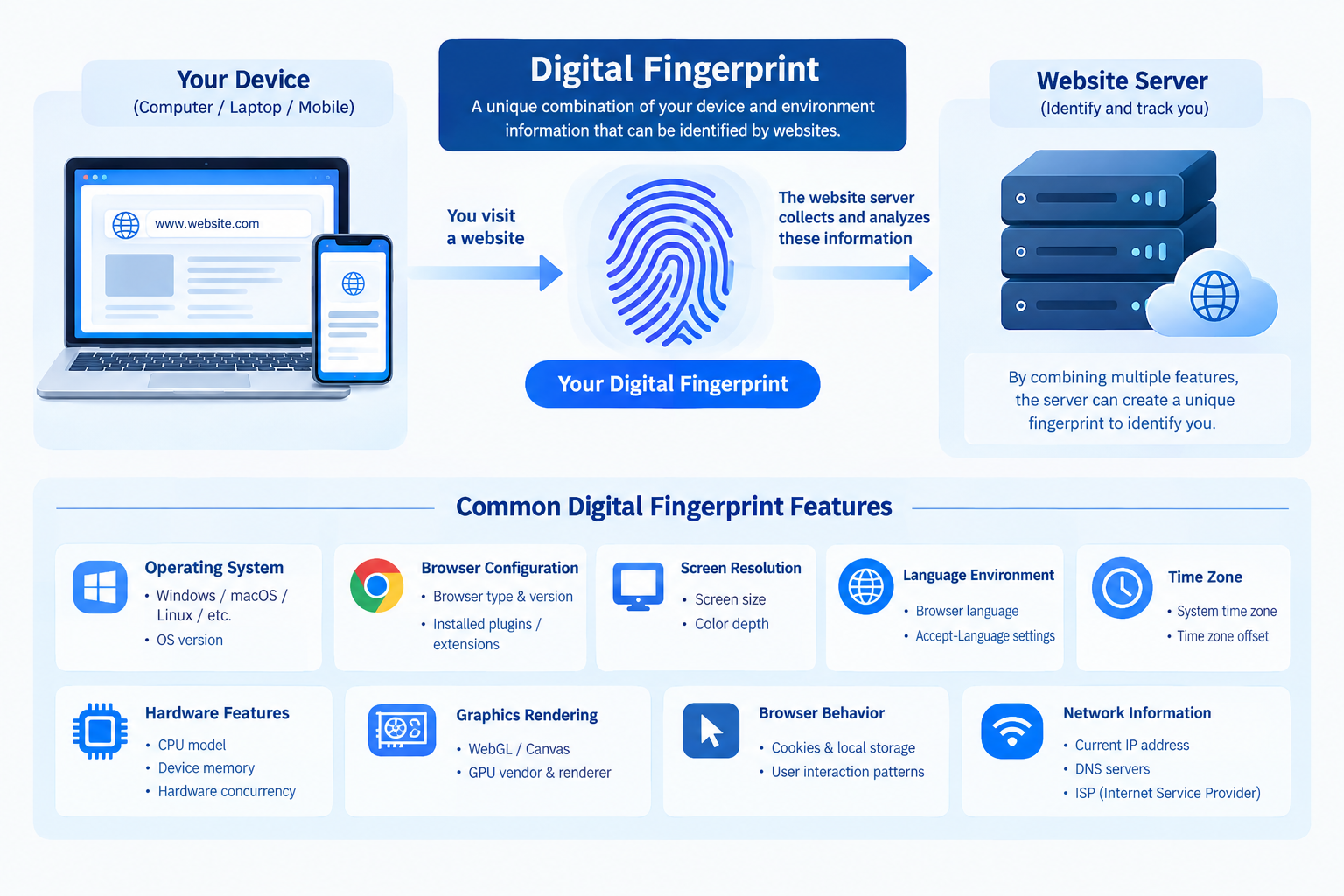
A digital fingerprint is created by combining multiple technical characteristics associated with a browser or device.
These characteristics may include operating system information, browser configuration, screen resolution, language, time zone, hardware characteristics, rendering behavior, and network-related signals.
The more distinctive the combination becomes, the easier it may be for a website to recognize a returning environment.
This is why modern account security cannot be understood simply as an IP-address problem.
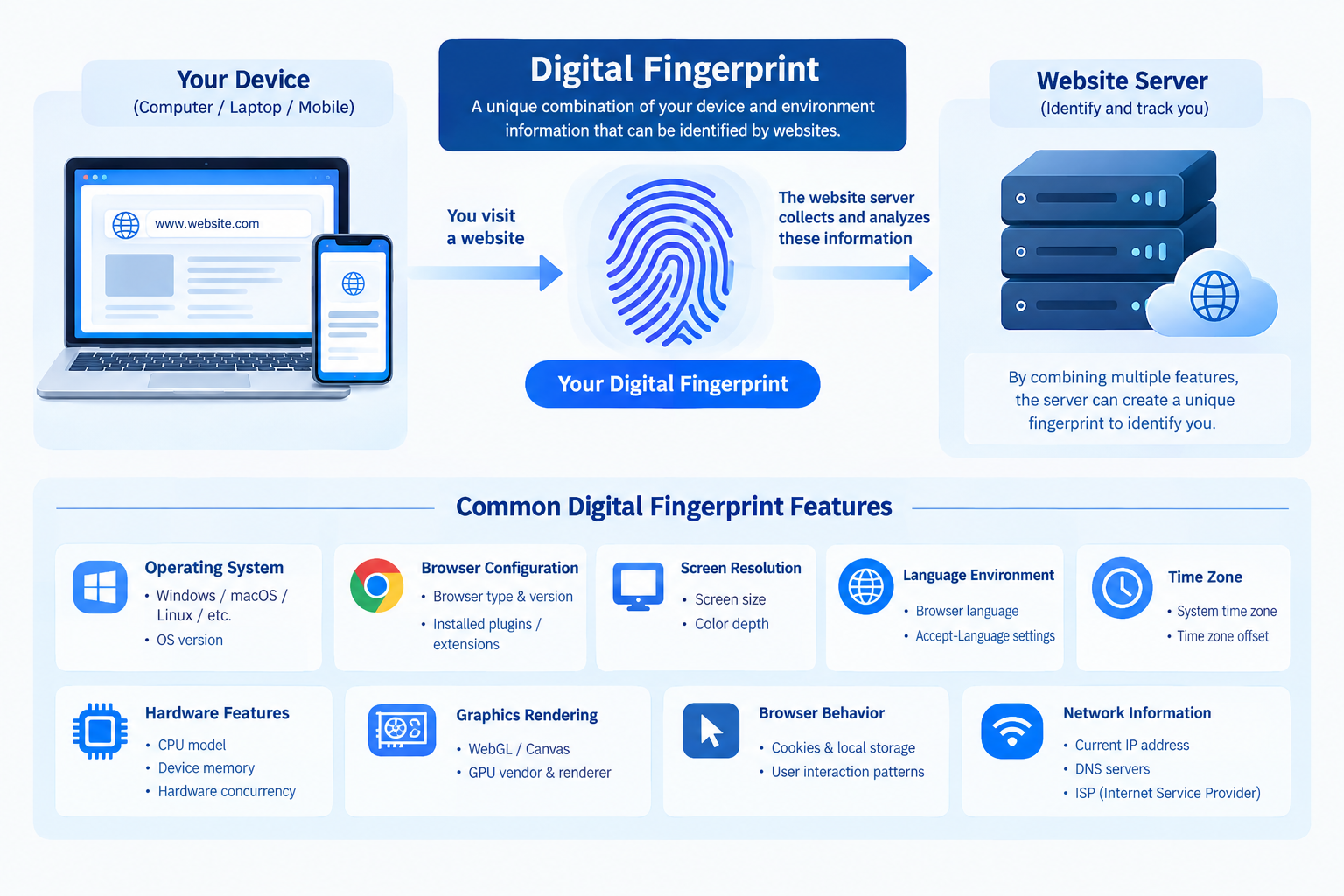
1.3 Why Clearing Cookies or Changing IPs Has Limitations
Clearing cookies can remove some locally stored information, but it does not necessarily change every characteristic of a browser or device.
Similarly, changing an IP address changes one aspect of the network environment, but other signals may remain unchanged.
For example, a browser may continue to expose similar:
- Screen characteristics
- Operating system information
- GPU rendering behavior
- WebGL characteristics
- Canvas behavior
- Browser configuration
- Time zone and language settings
As a result, changing your IP address does not automatically create a completely new digital environment.
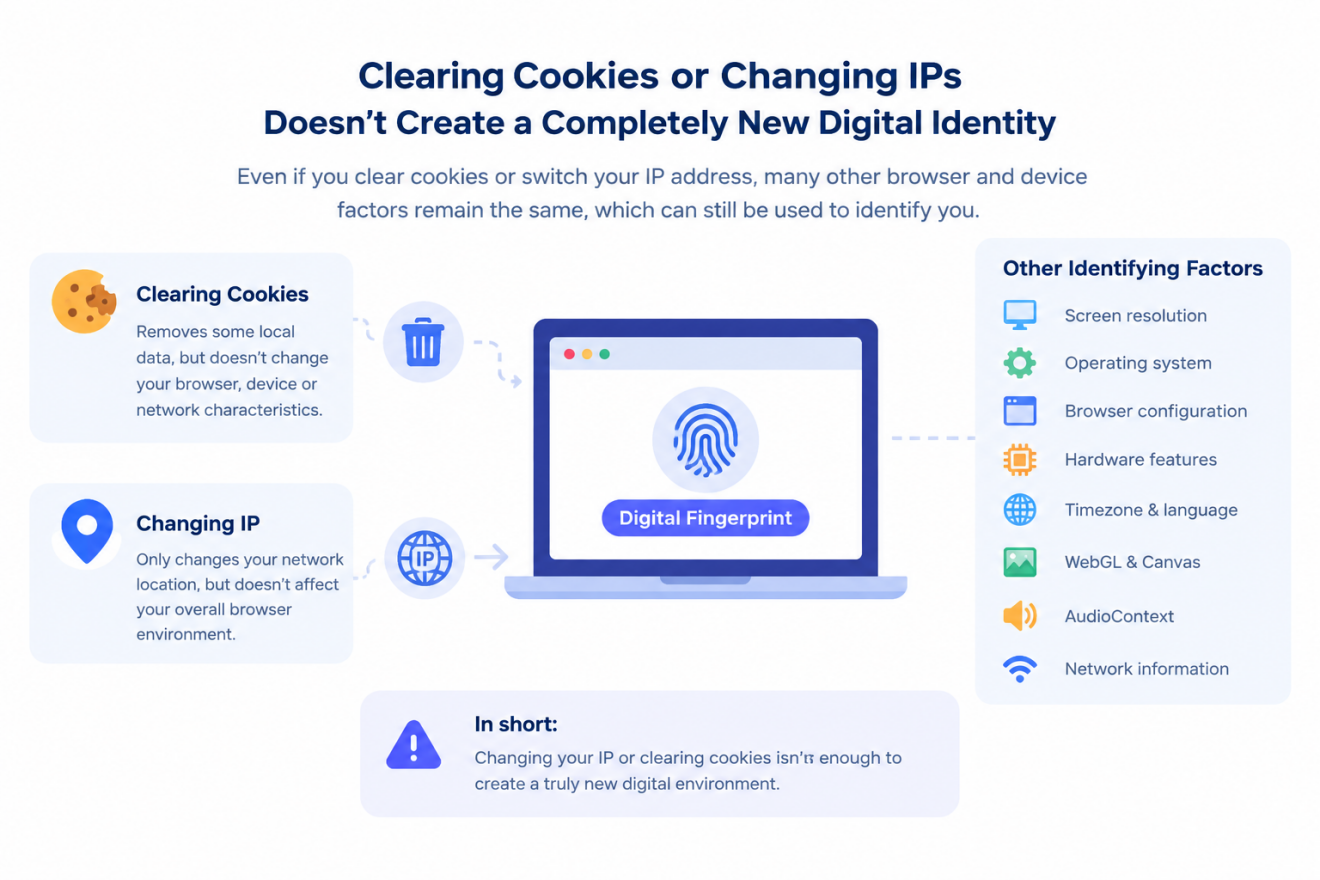
2. How Platforms Identify Your Device and Online Environment
To understand browser fingerprinting, it is useful to look at the different categories of information that can contribute to a digital identity.
2.1 What Information Does Your Browser Reveal?
When a browser connects to a website, it may provide or expose information related to:
- Operating system
- Browser version
- Screen resolution
- Language preferences
- Time zone
- Device characteristics
- Graphics capabilities
- Browser APIs
- Rendering behavior
Some of these parameters are relatively obvious, while others are obtained through browser technologies that users may never directly see.
Graphics rendering, for example, can expose characteristics associated with the device’s GPU and browser environment.
Audio-related browser APIs can also contribute additional fingerprinting signals.
2.2 What Is a Browser or Digital Fingerprint?
A browser fingerprint is essentially a collection of characteristics that can be used to distinguish one browser environment from another.
Rather than relying on one unique identifier, fingerprinting generally works by combining multiple signals.
Think of it as a digital profile rather than a single identification number.
A browser fingerprint may incorporate:
- Browser configuration
- Operating system
- Screen information
- Graphics rendering
- Hardware characteristics
- Language and time zone
- Canvas output
- Audio characteristics
- Network-related information
This makes browser fingerprinting fundamentally different from traditional cookie-based tracking.
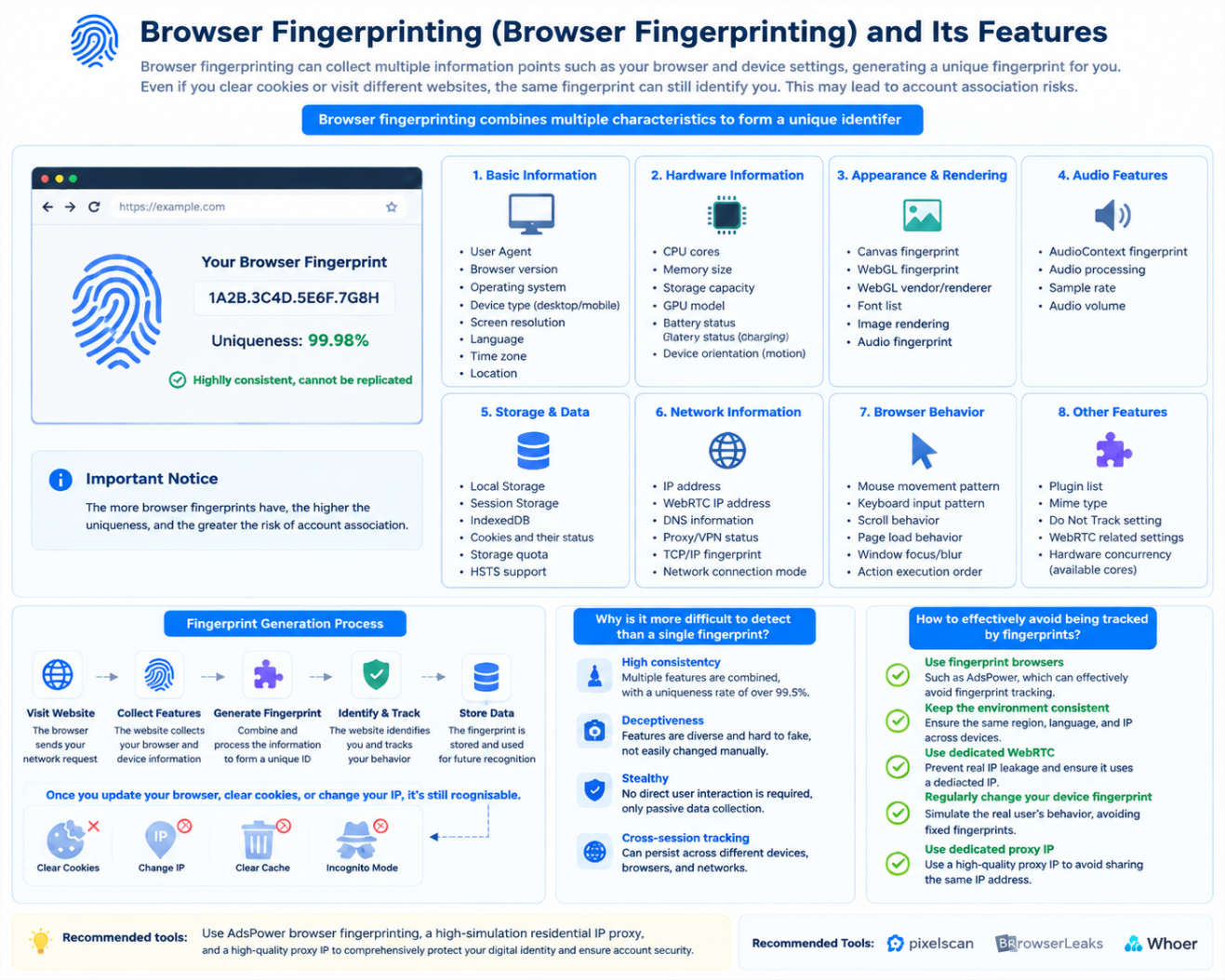
2.3 Network-Level Signals Used for Account Identification
Network information is another important layer of digital identity.
Common signals include:
IP Address
An IP address provides information about the network connection and can also be associated with a geographic region, network provider, or hosting environment.
DNS Information
DNS resolution can reveal characteristics of the network configuration and may sometimes expose inconsistencies between the apparent location and the actual network environment.
WebRTC
WebRTC is a browser technology designed to enable real-time communication.
Depending on the browser and network configuration, WebRTC-related behavior can potentially expose additional network information.
For this reason, network privacy should be considered together with browser fingerprinting rather than treated as a completely separate issue.
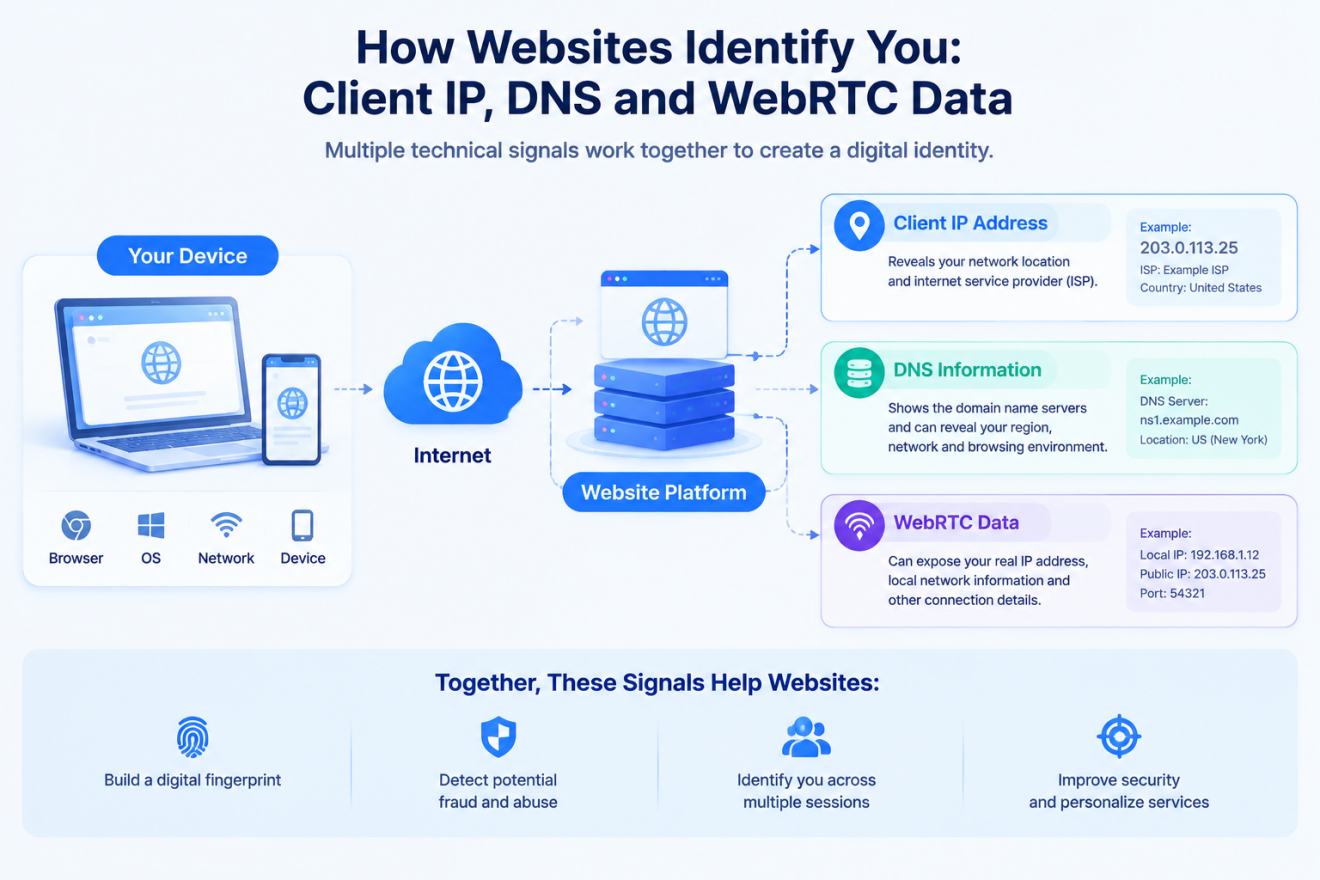
2.4 Hardware and Device Fingerprinting
Modern browsers can expose various characteristics related to the underlying device.
These may include:
- CPU-related information
- Number of logical processor cores
- Available memory
- GPU characteristics
- Screen configuration
- Graphics rendering behavior
When multiple parameters remain consistent over time, they can contribute to the recognition of a particular device environment.
2.5 Canvas and AudioContext Fingerprinting
Advanced fingerprinting techniques can use browser APIs to generate additional signals.
Canvas fingerprinting analyzes how a browser and graphics environment render specific visual elements.
Different combinations of operating systems, browsers, GPUs, drivers, and rendering implementations can produce slightly different results.
Similarly, AudioContext fingerprinting can use browser audio processing characteristics as another potential signal.
These techniques demonstrate why browser fingerprinting involves much more than simply reading a browser’s user-agent string.
3. How Behavioral Tracking Can Link Multiple Accounts
Technical characteristics are only one side of account identification.
Platforms can also analyze how an account behaves over time.
3.1 Browsing Behavior as an Account Association Signal
Human browsing behavior is rarely completely random.
Users tend to have relatively consistent patterns involving:
- Login times
- Active hours
- Page navigation
- Clicking behavior
- Session duration
- Browsing frequency
If multiple accounts repeatedly demonstrate highly similar patterns, behavioral information can potentially become another association signal.
This is especially relevant when managing multiple accounts over a long period.
3.2 Cookies, LocalStorage, and Persistent Browser Data
Cookies are only one component of browser storage.
Modern browsers can also retain information through mechanisms such as:
- LocalStorage
- Session-related data
- Cached resources
- Browser history
- Site preferences
- Other persistent browser storage
This information can contribute to the continuity of a browser environment.
For multi-account management, allowing unrelated accounts to share the same browser profile can therefore create unnecessary overlap.
3.3 Why Deleting Cookies Does Not Completely Reset Your Digital Identity
Deleting cookies may remove some account-related information, but it does not necessarily change:
- Device characteristics
- Browser configuration
- Graphics characteristics
- Screen information
- Operating system
- Network environment
This is why cookie deletion should not be considered equivalent to creating a completely independent browser environment.
4. How Anti-Detect Browsers Help Isolate Multiple Accounts
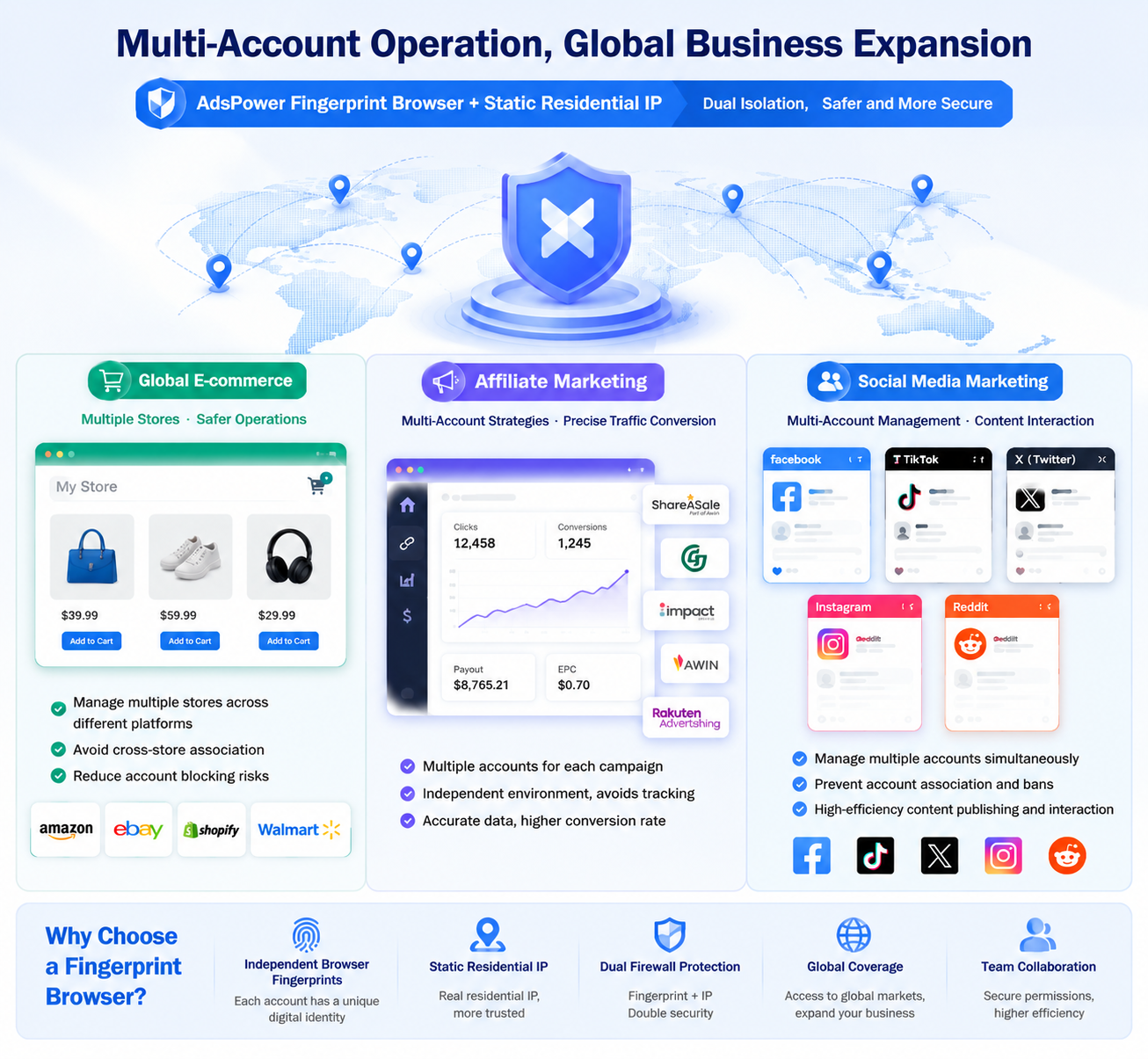
When managing multiple legitimate business accounts, one practical approach is to use separate browser profiles with isolated configurations.
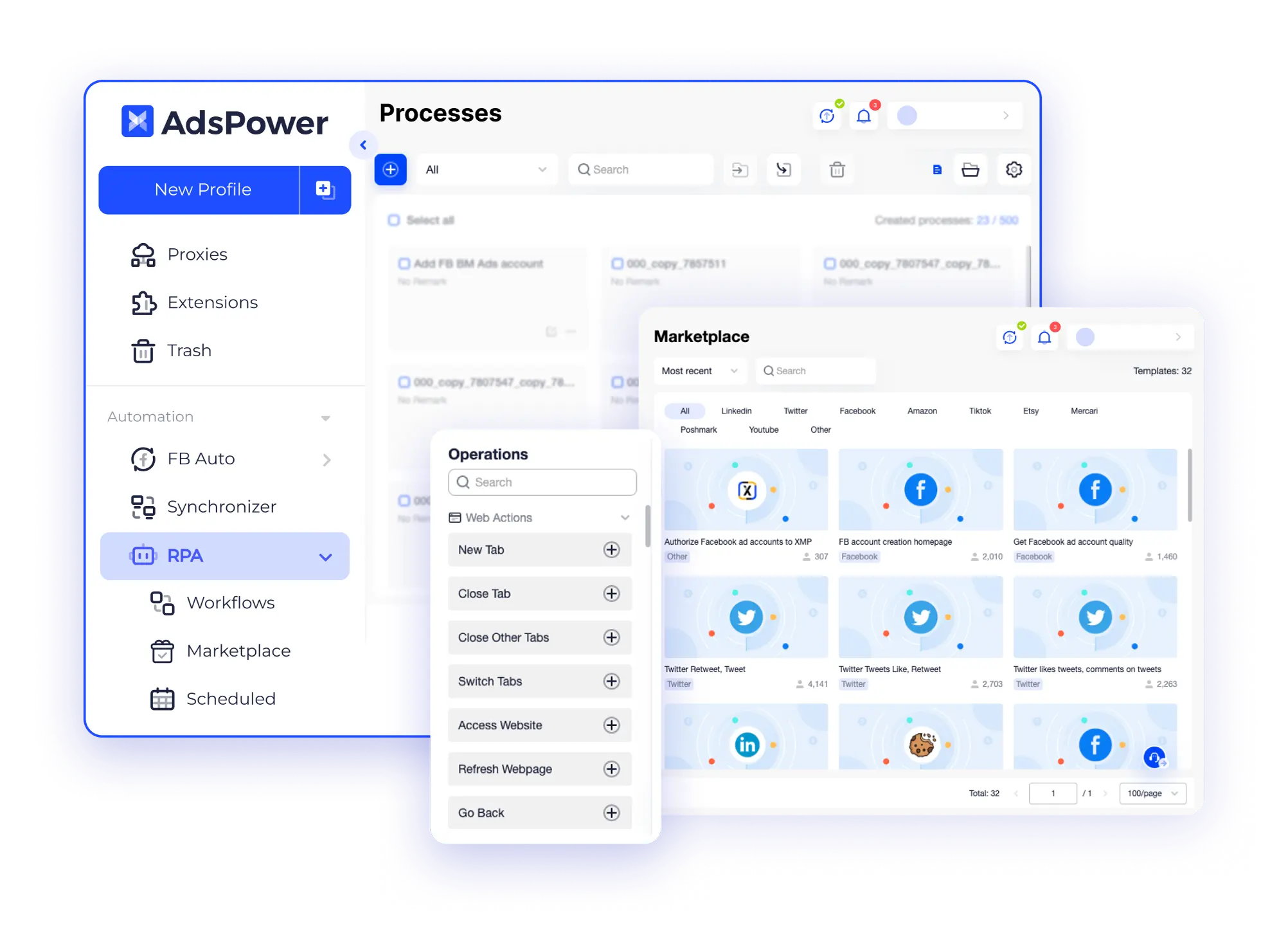
Tools such as AdsPower are designed around this concept.
AdsPower registration and download:https://www.adspower.net/share/techseb
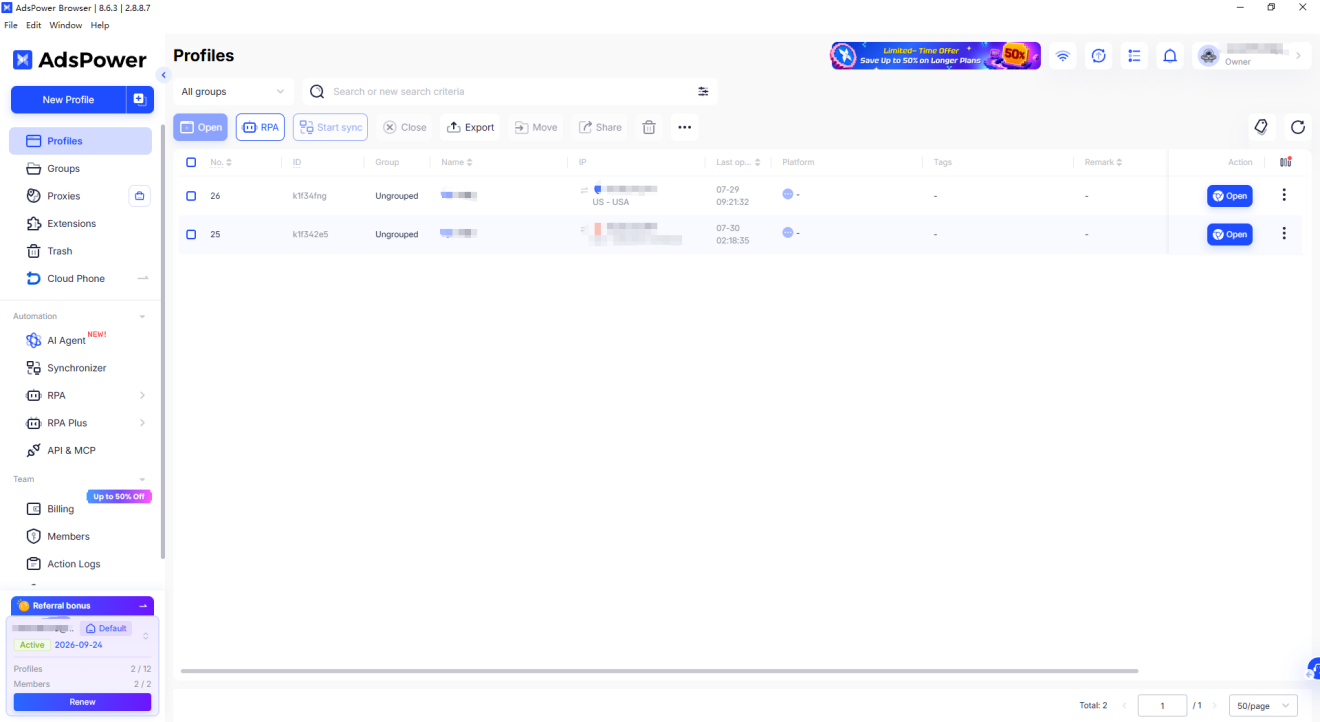
AdsPower Anti-Association Browser Environment Management Interface
4.1 What Is an Anti-Detect Browser?
An anti-detect browser is a browser environment designed to provide greater control over browser profiles and fingerprint-related parameters.
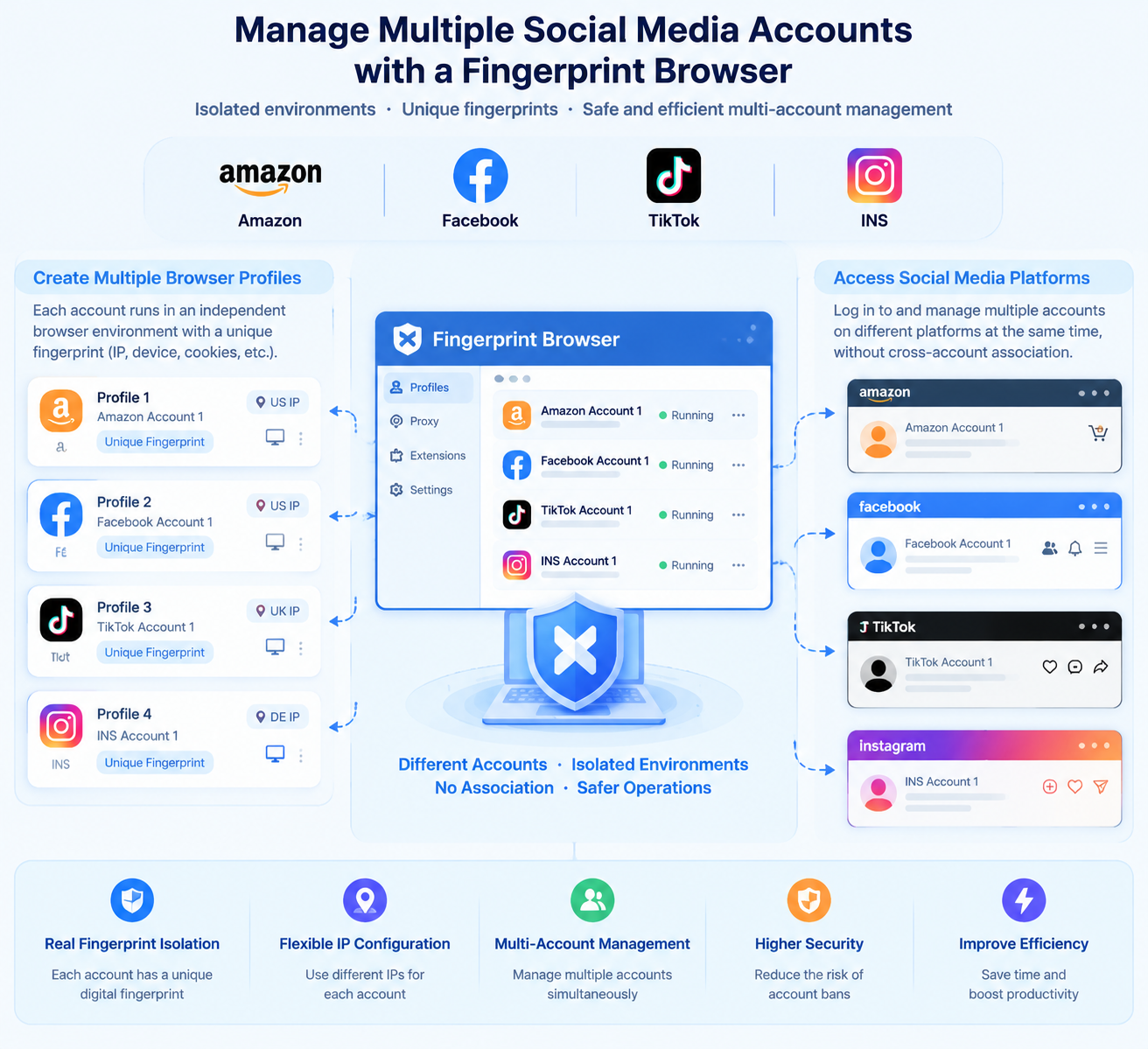
Instead of forcing multiple accounts to share a single browser environment, each account can operate inside its own dedicated profile.
The purpose is not simply to generate random technical parameters.
The more important objective is to create separate, consistent, and manageable browser environments.
4.2 Browser Profile Isolation
A dedicated browser profile can function as an independent digital workspace.
For example, one profile may be used for an Amazon store, while another is dedicated to a separate business account.
Each profile can maintain its own configuration and browser data.
This separation reduces the possibility of accidentally mixing account information.
4.3 Separating Cookies, Cache, and LocalStorage
Browser profile isolation can separate important local browser data, including:
- Cookies
- Cache
- LocalStorage
- Browsing history
- Session information
- Website preferences
This is particularly useful for users who need to switch between multiple accounts without repeatedly rebuilding the browser environment.
4.4 Isolating Network Environments With Dedicated Proxies
Browser profile separation can also be combined with independent proxy configurations.
Instead of every profile connecting through the same network environment, each profile can use its own designated proxy where appropriate.
This creates separation across multiple layers:
Account → Browser Profile → Browser Data → Network Environment
A layered approach is generally more organized than relying on IP switching alone.
5. Browser Fingerprint Management: Why Consistency Matters
One of the most important principles in browser fingerprint management is that random does not necessarily mean realistic.
A technically inconsistent environment may appear more unusual than a stable and coherent one.
5.1 Avoid Random Browser Fingerprints
Randomly changing every browser parameter may seem like a way to create a unique identity.
In practice, however, excessive randomness can create inconsistencies.
For example, a browser environment could theoretically combine:
- An unusual operating system
- An incompatible browser
- An unrealistic hardware configuration
- An inconsistent time zone
- An unrelated language setting
Such combinations may not represent a normal real-world device.
A better approach is to focus on logical consistency.
5.2 Maintain Geographic and Time Zone Consistency
Geographic consistency is an important part of maintaining a coherent browsing environment.
For example, if an account is normally operated through a UK-based network environment, the browser’s language and time-zone configuration should not constantly suggest a completely unrelated location.
The goal is not to fabricate a location, but to avoid unnecessary contradictions between different technical signals.
5.3 Keep Browser and Hardware Parameters Realistic
Browser and hardware parameters should make technical sense together.
For example, a Windows-based environment should not normally present a configuration that is clearly inconsistent with the browser and hardware combination.
Similarly, CPU, memory, GPU, and screen characteristics should form a technically plausible environment.
This principle is particularly important when managing multiple browser profiles over an extended period.
5.4 Why Fingerprint Stability Matters for Long-Term Account Management
Constantly changing the environment associated with the same account can create unnecessary inconsistencies.
Long-term account management generally benefits from maintaining a relatively stable environment.
In other words:
Consistency is often more useful than constant randomization.
For legitimate business operations, each account should ideally have a clearly defined operating environment that remains stable unless there is a genuine reason to change it.
6. Multi-Account Management Strategies for Amazon
Amazon is one of the most important platforms for cross-border e-commerce, but its account and seller policies require careful attention.
Browser isolation can help organize separate business environments, but it should never be treated as a method for bypassing Amazon’s policies.
6.1 Why Amazon Has Strict Account Risk Controls
Amazon operates a large and complex marketplace involving sellers, buyers, payments, logistics, product listings, and customer data.
Because of this, the platform uses multiple layers of security and account monitoring.
Technical environment signals may be only one part of its broader account-security process.
6.2 Common Account Environment Problems on Amazon
Problems can occur when account environments are inconsistent or poorly organized.
Examples may include:
- Frequently changing network environments
- Sharing browser profiles between unrelated accounts
- Mixing cookies and session data
- Using inconsistent browser configurations
- Connecting accounts from unexpected environments
These situations may create additional verification requirements or security checks.
6.3 Maintaining a Stable Browser Fingerprint for Each Store
For users who legitimately operate multiple stores or business environments, maintaining a dedicated browser profile for each store can simplify account management.
Each profile can maintain its own browser data and configuration.
The objective is to prevent accidental cross-contamination between different workspaces while maintaining a stable operating environment.
6.4 Using Residential IPs With Isolated Browser Profiles
A residential IP can provide a network environment associated with a residential ISP rather than a typical data-center infrastructure.
For some business scenarios, sellers may prefer high-quality residential connectivity because of its network characteristics.
However, IP type alone does not determine account security.
The network environment should be considered together with browser configuration, account activity, platform policies, and other operational factors.
7. Multi-Account Management for Facebook and TikTok
Social media platforms can place significant emphasis on login patterns, device consistency, and account behavior.
7.1 Why Social Media Platforms Monitor Login Environments
Platforms such as Facebook and TikTok need to distinguish normal account activity from potentially compromised or suspicious access.
Frequent changes in:
- Device
- Browser
- IP address
- Geographic location
- Login pattern
may result in additional security verification.
Maintaining a consistent browser environment can therefore make everyday account management more organized.
7.2 How Frequent Device and IP Changes Can Trigger Security Checks
Imagine an account that normally logs in from one device and network environment.
If the same account suddenly appears from several unrelated devices and locations within a short period, the activity may look unusual.
This does not automatically mean that an account will be restricted, but it can increase the likelihood of additional verification.
For long-term account management, environmental consistency is generally preferable to unnecessary changes.
7.3 Maintaining Cookies and LocalStorage
A dedicated browser profile can preserve cookies and LocalStorage associated with an account.
This means the account can retain its established browser state instead of repeatedly starting from a completely new session.
The benefit is primarily operational consistency and convenience.
7.4 Using RPA for Repetitive Browser Management Tasks
RPA, or Robotic Process Automation, can automate certain repetitive browser tasks.
For example, businesses may use RPA to streamline routine workflows involving:
- Opening predefined pages
- Collecting information
- Performing repetitive administrative actions
- Organizing browser-based workflows
Automation should always remain within the rules of the platform involved.
RPA is best viewed as a productivity tool rather than a mechanism for bypassing platform security or enforcement systems.
8. Why Incognito Mode and Virtual Machines Are Not Complete Solutions
Incognito mode and virtual machines can both provide useful functions, but neither should automatically be considered a complete multi-account isolation solution.
8.1 Can Virtual Machines Completely Isolate Multiple Accounts?
Virtual machines create separate operating-system environments, which can provide a degree of isolation.
However, virtualization environments may have recognizable characteristics.
Hardware configurations, virtualization-related properties, network settings, and other environmental signals may still differ from those of a typical physical device.
Therefore, simply running one account inside each virtual machine does not automatically guarantee complete digital separation.
8.2 What Incognito Mode Does and Does Not Hide
Incognito mode is mainly designed to limit the amount of browsing information retained locally after a private session.
It does not mean that websites cannot observe browser and device characteristics.
For example, browser fingerprinting techniques may still analyze:
- Canvas characteristics
- WebGL behavior
- Screen information
- Browser configuration
- Device characteristics
- Network information
Therefore, incognito mode should not be confused with fingerprint protection.
8.3 Browser Fingerprinting Beyond Cookies
One of the biggest misconceptions about online privacy is assuming that cookies represent the entire digital identity of a browser.
They do not.
A website can potentially combine multiple categories of signals to understand whether a browser environment is familiar.
This is why browser fingerprinting has become an important topic in modern online privacy and account security.
8.4 Dedicated Browser Profiles vs. Traditional Isolation Methods
Traditional methods such as incognito mode and virtual machines each have specific use cases.
Dedicated browser profiles provide a different approach by focusing specifically on browser-level environment separation.
For users who regularly manage multiple accounts, this can make it easier to maintain:
- Separate cookies
- Separate LocalStorage
- Separate browser configurations
- Separate proxy settings
- Separate operational environments
The best solution depends on the specific business requirements and platform policies.
9. Comparing Multi-Account Isolation Methods
There is no single isolation method that works for every situation.
The following comparison provides a general overview:
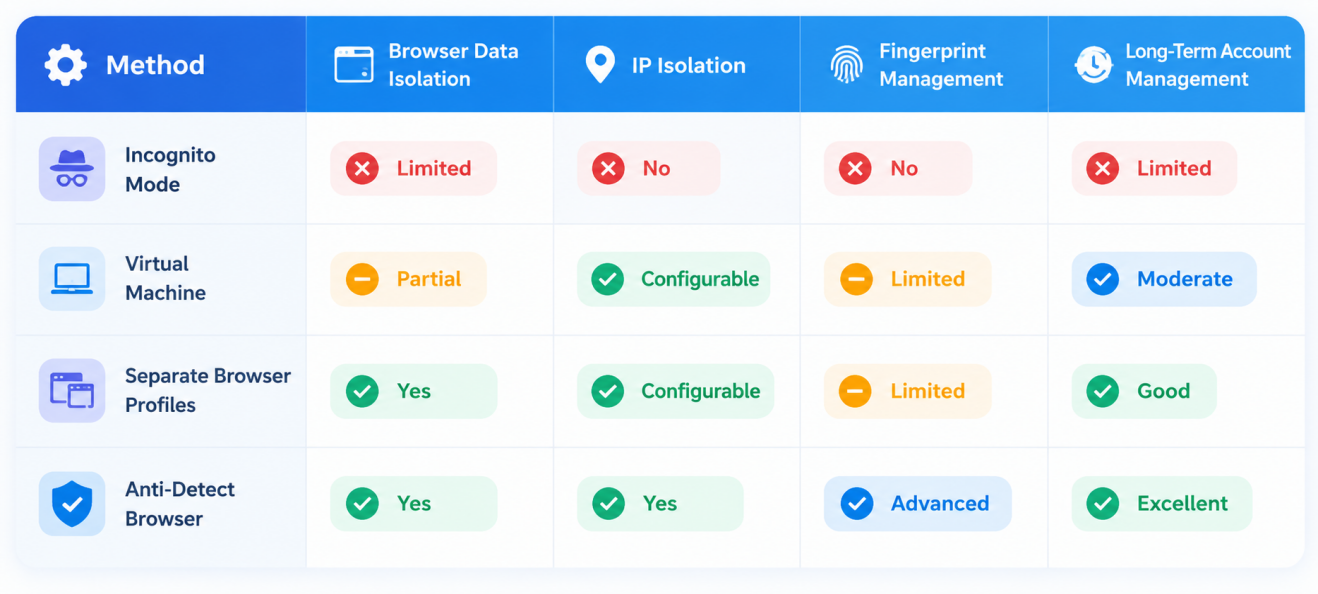
Incognito Mode
Incognito mode is convenient for temporary private browsing but is not designed specifically for long-term multi-account management.
Virtual Machines
Virtual machines provide stronger operating-system-level isolation but may require more resources and technical maintenance.
Separate Browser Profiles
Standard browser profiles provide useful separation of cookies and browsing data but generally offer less control over fingerprint-related parameters.
Anti-Detect Browsers
Professional anti-detect browsers provide more advanced browser profile management and fingerprint configuration capabilities.
For users managing multiple legitimate business environments, they can provide a more centralized way to organize browser profiles.
10. Frequently Asked Questions About Browser Fingerprinting and Account Security
10.1 Can an Anti-Detect Browser Prevent My Account From Being Banned?
No.
An anti-detect browser cannot guarantee that an account will never be suspended or restricted.
Account security depends on many factors, including:
- Platform policies
- Product compliance
- Account behavior
- Payment information
- Logistics
- Content
- Business practices
- Network environment
Browser environment isolation addresses only one part of the overall problem.
The original article also emphasizes that technical isolation itself is not a guarantee against account bans.
10.2 What Is the Difference Between Free and Paid Anti-Detect Browsers?
The major differences can include fingerprint configuration quality, browser-profile management capabilities, update frequency, automation functionality, proxy management, and overall stability.
Free tools may provide limited or fixed configurations.
Professional tools may offer more sophisticated profile management and regularly updated fingerprint technologies.
However, users should evaluate a tool based on their actual business requirements rather than assuming that a paid product automatically provides complete account protection.
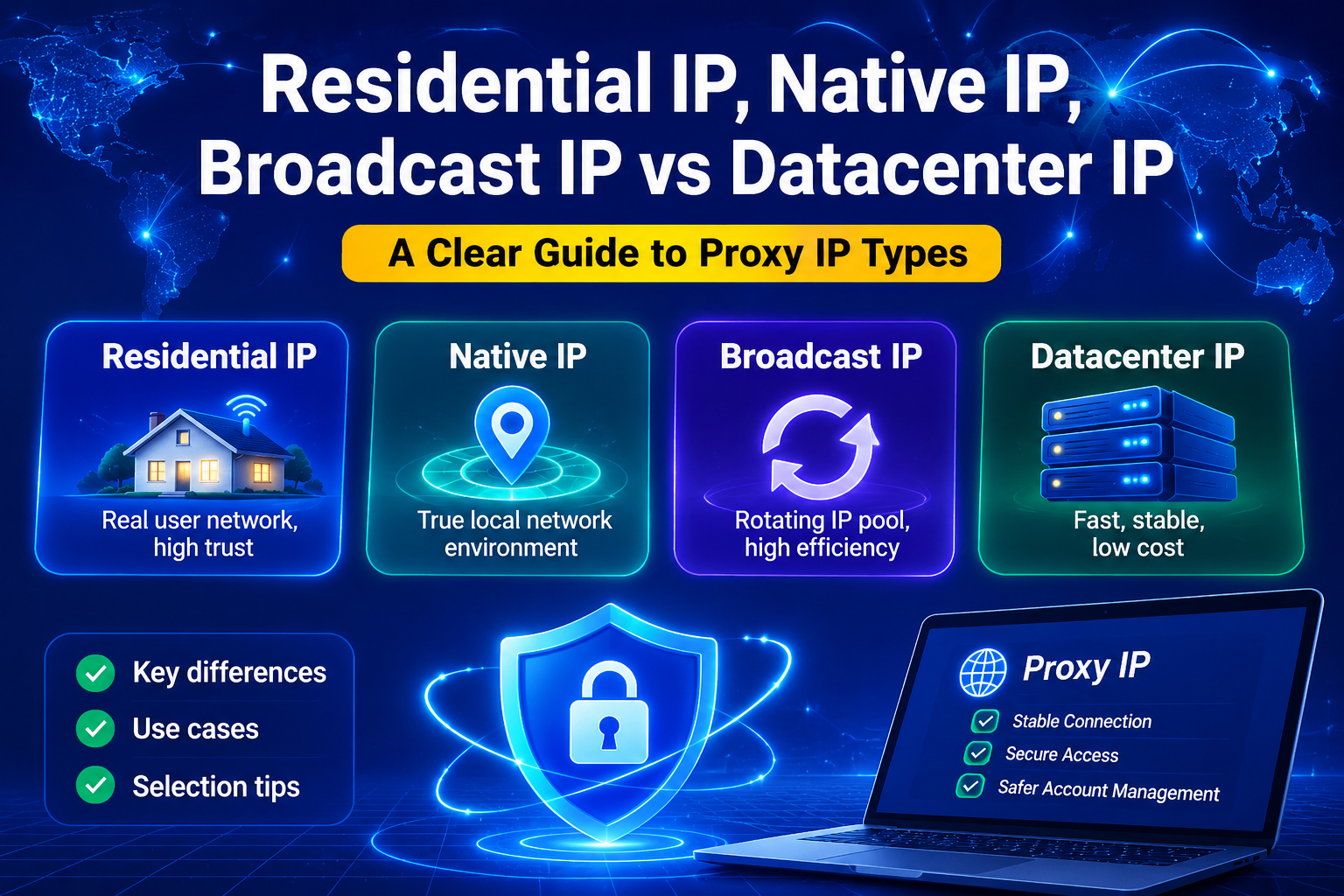
10.3 Are Residential IPs Better Than Data Center IPs?
Not necessarily.
Residential IPs and data-center IPs serve different purposes.
Residential IPs are associated with residential ISP networks and can be useful when a business requires residential network characteristics.
Data-center IPs are generally easier to provision and can be more cost-effective for certain activities such as testing, research, and other lower-risk use cases.
The appropriate choice depends on the platform, geographic requirements, account type, budget, and operational scenario.
10.4 Is Changing an IP Address Enough to Separate Multiple Accounts?
No.
Changing an IP address only changes one part of the environment.
Browser fingerprints, cookies, LocalStorage, device characteristics, network configuration, and behavioral patterns may remain unchanged.
Effective account environment management therefore requires a broader approach than IP rotation alone.
10.5 Can Browser Fingerprinting Be Completely Disabled?
In practice, completely eliminating every browser fingerprinting signal is not a realistic goal.
Modern websites can analyze many browser and device characteristics.
A more practical approach is to understand which signals may be exposed and maintain a consistent, controlled, and legitimate browsing environment.
11. Final Thoughts: Build a Stable and Compliant Multi-Account Environment
Cross-border e-commerce is becoming increasingly dependent on digital platforms, and account security is becoming more complex as platform risk-control systems continue to evolve.
For this reason, simply changing an IP address or deleting cookies is no longer enough to understand the complete picture.
A modern account environment may involve multiple layers:
IP Address → Network Configuration → Browser → Device → Fingerprint → Cookies → Behavioral Signals
Each layer can contribute information about an account’s operating environment.
Browser fingerprinting and dedicated browser profiles can therefore play an important role in cross-border e-commerce account security and multi-account management.
Tools such as AdsPower can help businesses organize separate browser environments, isolate browser data, manage individual profiles, and configure different network environments.
However, technology should never be considered a substitute for platform compliance.
The most sustainable strategy is to combine:
Stable Browser Environments + Appropriate Network Configuration + Account Isolation + Consistent Operations + Platform Compliance
The objective is not to bypass platform rules or evade legitimate security controls.
Instead, the goal is to create a clean, organized, and manageable digital workspace in which each legitimate business account can be operated consistently.
Ultimately, long-term success in cross-border e-commerce depends on much more than technical tools. Product quality, customer service, logistics, business practices, and compliance remain the foundation of sustainable account management.

0 条评论